
Trustfull Login
Overview
Introduction
Trustfull Login evaluates the integrity of a login attempt by comparing it against the original enrollment session. Instead of validating signals in isolation, it focuses on continuity over time, checking whether device, browser, network, and behavioral characteristics observed at login are consistent with what was previously recorded for the same identity.
This makes it possible to detect account takeover, credential stuffing, and unauthorized access, while minimizing false positives for legitimate users logging in from familiar environments.
Want to learn how to set it up? Visit the dedicated Trustfull Login API Reference.
Below, each section explains:
- What we observe in a genuine login
- What we observe in a risky login
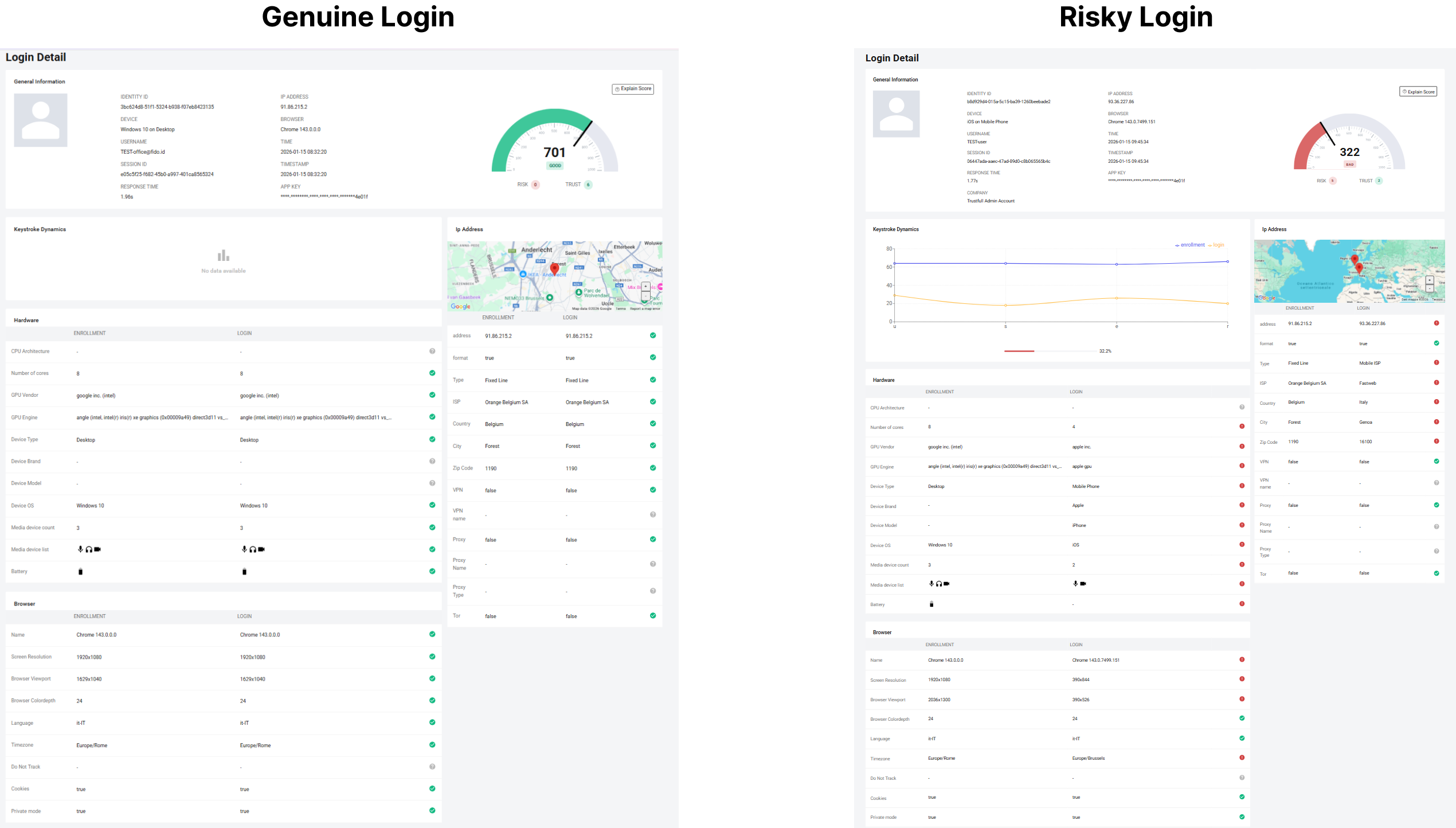
General Information
This section displays the core identifiers and metadata associated with the login attempt:
- Identity ID: Unique identifier of the user
- Username: Identifier used during login
- Session ID: Unique identifier of the login session
- Device: Device type detected at login
- Browser: Browser name and version
- IP Address: Network address used during login
- Timestamp: When the login occurred
- Response Time: Time taken to complete the evaluation
- App Key: API key used to process the request
This box provides the contextual anchor needed to interpret all comparisons shown in the sections below.
Score
Genuine Login
- Score:
700–1000| Label:GOOD| Risk Signals:0| Trust Signals:5+
A genuine login shows strong continuity with the enrollment session, with matching device, browser, IP, and behavioral characteristics that indicate the same legitimate user accessing the account.
Risky Login
- Score:
0–400| Label:BAD| Risk Signals:5+| Trust Signals:0–2
A risky login typically emerges when multiple attributes diverge from enrollment, suggesting access from a different environment rather than normal user behavior.
Reason Codes Examples
- Trust codes: Login Match Operating System | Login Match Device Type | Login Match Browser Name | Login Match Ip City | Login Match Ip Country
- Risk codes: Login No Match Operating System | Login No Match Device Type | Login No Match Browser Name | Login No Match Ip City | Login No Match Ip Country
Curious how the score is calculated? Explore our Reason Codes and the Scoring Methodology and that drives it.
Keystroke Dynamics
This section compares typing behavior between enrollment and login.
Genuine Login
- Similar typing rhythm across sessions
- Stable timing between keystrokes
- High overlap with enrollment pattern
Behavioral patterns such as typing cadence tend to remain stable for the same individual and are difficult to reproduce precisely by attackers.
Risky Login
- Noticeable deviation from enrollment rhythm
- Irregular or inconsistent timing
- Low similarity score
When credentials are compromised, attackers are unable to replicate the original user’s typing behavior, resulting in measurable divergence.
IP Address Comparison
This section compares network attributes observed at enrollment and login.
Genuine Login
- Same or nearby geographic location
- Country and city match
- Same IP type (fixed line or mobile)
- No VPN, proxy, or Tor usage
Legitimate users typically log in from predictable locations and network environments, even when sessions occur at different times.
Risky Login
- Country or city mismatch
- Different IP type
- ISP changes between sessions
- Sudden geographic shifts
These patterns are common in account takeover scenarios, where attackers connect from infrastructure unrelated to the original user.
Hardware Comparison
This section compares device-level characteristics between enrollment and login.
Genuine Login
- Same device type
- Same operating system
- Comparable CPU and GPU attributes
- Similar media device configuration
Hardware stability over time strongly suggests continuity of the physical device used by the account owner.
Risky Login
- Device type mismatch
- Operating system change
- Different GPU vendor or engine
- Media device discrepancies
Simultaneous changes across hardware attributes are unlikely for legitimate users and typically indicate access from a different physical device.
Browser Comparison
This section compares browser-level attributes between enrollment and login.
Genuine Login
- Same browser name and version
- Matching screen resolution and viewport
- Same language and timezone
- Consistent cookie and private mode settings
Browser configurations tend to remain stable for legitimate users, especially across short timeframes.
Risky Login
- Browser name or version mismatch
- Resolution or viewport changes
- Timezone inconsistency
- Language differences
These inconsistencies often appear when credentials are reused across different devices or automated environments.
Final Takeaway
A genuine login:
- Preserves continuity across device, browser, and network
- Matches enrollment behavior and configuration
- Reflects normal user access patterns
A risky login:
- Breaks continuity across multiple dimensions
- Shows device, browser, or location divergence
- Indicates potential account takeover or unauthorized access
Trustfull Login enables real-time detection of suspicious access attempts while preserving a smooth experience for legitimate users by focusing on consistency rather than friction.
📚 Resources
- Support Center — Assistance and answers from the Trustfull team.
- Trustfull Login API Reference page — Technical guidance on setup.
Updated 1 day ago