
Trustfull Session
Overview
Trustfull Session analyzes a full web session fingerprint to estimate in real time whether the traffic comes from a legitimate user or from automation, spoofing, or manipulated environments.
Instead of relying on a single signal, Trustfull combines device, browser, IP, and consistency checks to detect bots that mimic humans (account farming, credential stuffing, scripted signups) while keeping genuine sessions frictionless.
Want to learn how to set it up? Visit the dedicated Trustfull Session API Reference.
Below, each section explains:
- What we see in genuine sessions
- What we see in risky sessions
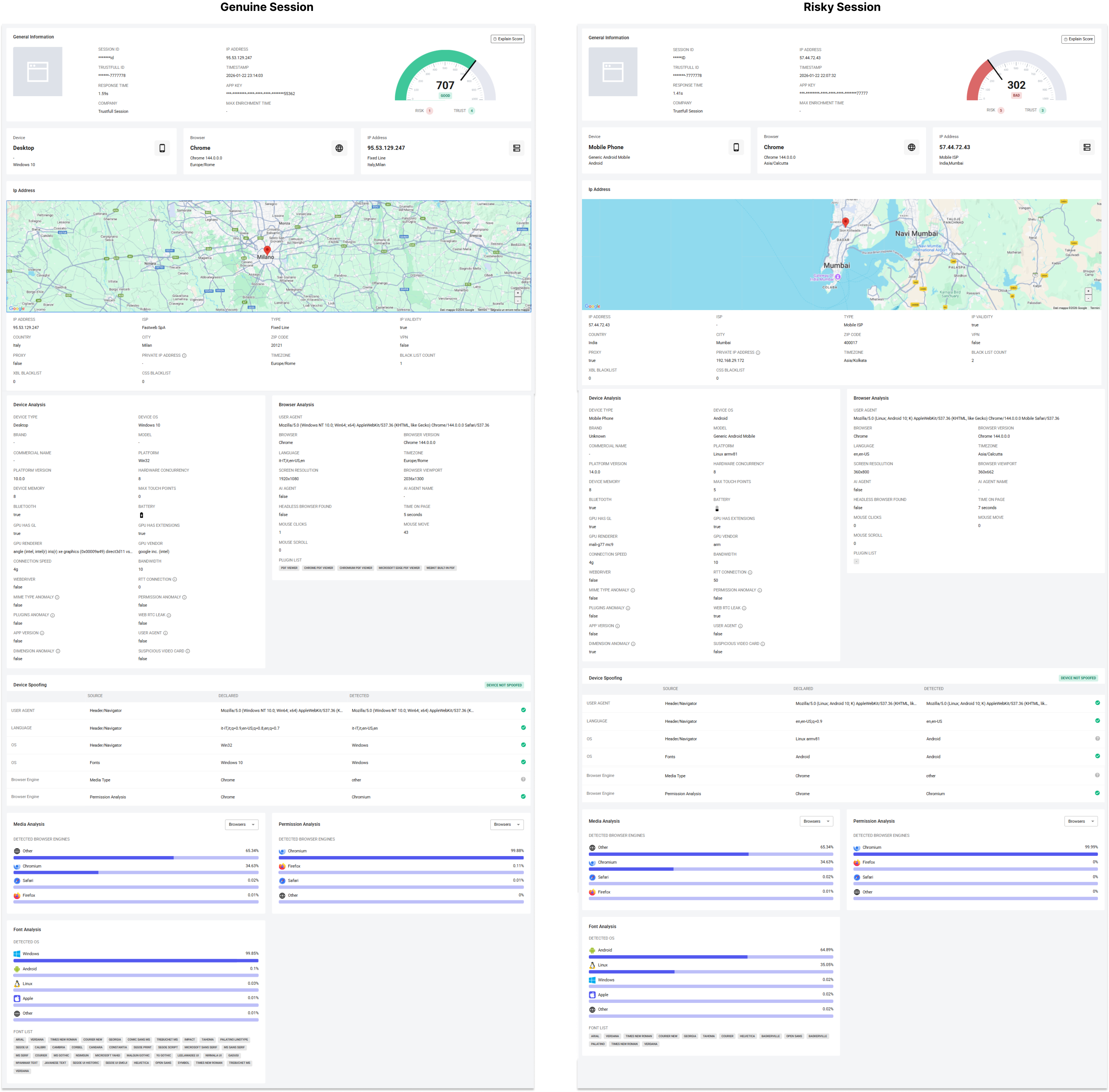
General Information
This section displays general metadata about the lookup, plus a quick snapshot of the session context from the summary boxes shown at the top of the page.
- Session ID / Trustfull ID: identifiers used to retrieve and correlate the session
- Timestamp: when the session result was generated
- App Key: environment key used by the JS snippet
- Response time / Max enrichment time: processing latency and time budget
- Device / Browser / IP snapshot: high-level fingerprint (device type and OS, browser name/version and timezone, IP country/type)
This box provides the overall context in which the session score should be interpreted.
Score
Genuine Session
- Score:
650–1000/1000| Label:GOOD / HIGH| Risk Signals:0–1| Trust Signals:2+
A strong score indicates a session where the environment looks standard, the connection is not masked, and the fingerprint signals reinforce each other across independent checks.
Risky Session
- Score:
0–300/1000| Label:POOR / LOW| Risk Signals:3+| Trust Signals:0–1
Low scores emerge when the session shows patterns typical of automation or manipulation, such as masked IPs, spoofed attributes, or browser behavior that rarely matches real users.
Reason Codes Examples
- Trust codes: IP Regular Connection | IP Regular Connection | IP Regular Connection
- Risk codes: IP Masking (Proxy) | IP Masking (VPN) | IP Masking (TOR) | IP Blacklisted
Curious how the score is calculated? Explore our Reason Codes and the Scoring Methodology and that drives it.
Device Analysis
Genuine Session
- Device type and OS look typical for the flow
- Hardware characteristics appear realistic
- No anomalies in device capabilities
- No spoofing indicators triggered
Real devices usually produce internally consistent signals across OS, hardware, and capability checks, resulting in a stable and believable device profile.
Risky Session
- Device appears overly generic or inconsistent
- Hardware or concurrency patterns suggest emulation or automation
- Device attributes conflict with other session signals
- Multiple anomaly indicators appear together
Automation environments often struggle to replicate the full complexity of real devices, leading to subtle inconsistencies that surface in this box.
Browser Analysis
Genuine Session
- Browser name, version, and user agent align
- Language and timezone look coherent
- No headless or automation indicators
- Basic interaction metrics look human
Genuine users typically run mainstream browsers in standard configurations, producing fingerprints that align naturally across browser metadata and behavior.
Risky Session
- Browser metadata suggests automation or manipulation
- Unusual language or timezone patterns
- Extremely short or minimal interaction
- Indicators consistent with scripted browsing
Bots can fake surface-level attributes, but browser-level inconsistencies accumulate when automation is involved.
Device Spoofing
This box compares what the session declares (headers, navigator, fonts, media types, permissions) against what Trustfull detects at runtime.
Genuine Session
- Declared and detected signals match
- OS and browser engine align across sources
- No spoofing outcome flagged
When a real browser runs on a real device, independent detection methods converge on the same result.
Risky Session
- Declared vs detected mismatches across attributes
- OS or browser engine discrepancies
- Spoofing outcome flagged
Spoofing tools often modify only part of the fingerprint, creating conflicts between declared metadata and actual capabilities.
Media, Permission & Font Analysis
These three boxes estimate the most likely browser engine and OS based on different evidence sources (media types, permission behavior, installed fonts).
Genuine Session
- A clear dominant engine/OS emerges
- Results are consistent across the three analyses
- Inferred engine matches declared browser
In genuine sessions, these independent classifiers reinforce each other, increasing confidence in the authenticity of the environment.
Risky Session
- Classifiers disagree or show fragmented results
- Inferred engine does not match declared metadata
- Combined with spoofing signals, suggests manipulation
When environments are engineered or emulated, these analyses often stop converging, revealing inconsistencies that are hard to fake simultaneously.
Final Takeaway
A genuine session:
- Runs on a real device and browser
- Shows consistent signals across independent checks
- Uses a regular, non-masked connection
- Produces a coherent fingerprint
A risky session:
- Shows automation or spoofing patterns
- Has mismatches between declared and detected attributes
- Produces inconsistent results across analyses
- Often relies on masked or manipulated environments
Trustfull Session is designed to distinguish these profiles in real time, enabling accurate bot detection and fraud prevention without harming legitimate users.
📚 Resources
- Support Center — Assistance and answers from the Trustfull team.
- Trustfull Session API Reference page — Technical guidance on setup.
Updated 5 days ago