
Agents
Agents automate recurring Trustfull requests.
Configure the product, input, and schedule once. The Agent then runs the task automatically and can notify you when a score falls below your chosen threshold.
For example, a Domain Agent can run a request for example.com every day and notify your team when its score falls below 451.
Enterprise OnlyAgents are part of the Enterprise plan. A request from an App Key without it returns
403with the messageThis App Key is not enabled for Agents.Contact your account manager to enable Agents.
One-off requests and Agents
Agents are optional and separate from normal API requests. Creating an Agent does not change how your existing integrations work.
| One-off request | Agent |
|---|---|
| Runs once, on demand | Runs automatically on a schedule |
| Produces one result | Produces a new result on every run |
| Starts when you call the API or use Run Check | Starts according to its saved schedule |
| Has no recurring configuration | Saves the product, input, schedule, and optional alerts |
Use a one-off request when you need an answer now. Use an Agent when the same task should run repeatedly and you want to be alerted to a low score.
The Agent model
An Agent is a saved configuration that runs Requests on a schedule. Each Request produces a Result, and Trustfull can send an Alert when the score falls below the configured threshold.
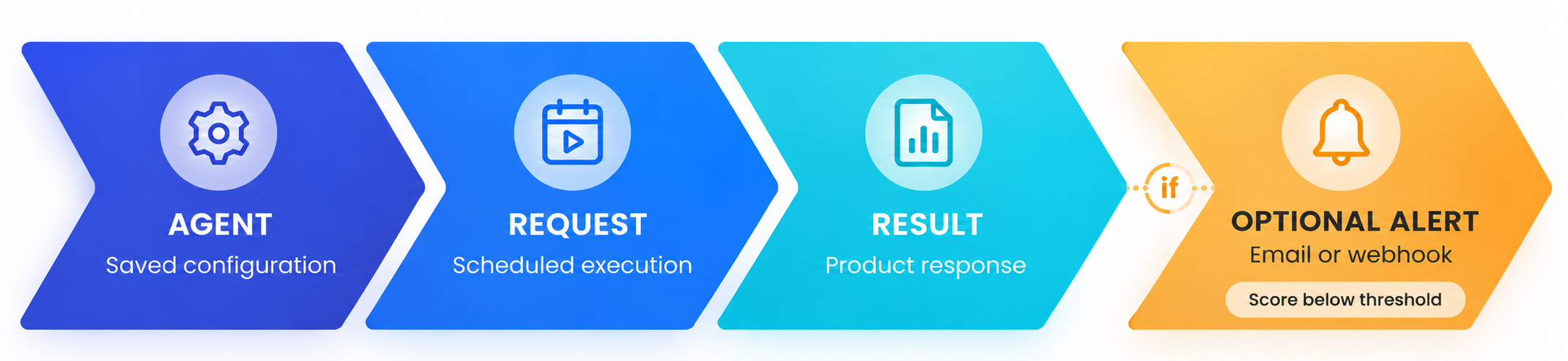
The final step is optional: Trustfull sends an Alert only when you configure a notification channel and the score is below the threshold.
The Agent model is designed to work across all Trustfull products. The current release supports Domain only.
Supported products
| Product | Agent availability |
|---|---|
| Trustfull Domain | 🟢 Available |
| Trustfull Phone | 🟡 Coming soon |
| Trustfull Email | 🟡 Coming soon |
| Trustfull IP | 🟡 Coming soon |
| Multiple products | 🟡 Coming soon |
Products marked Coming soon remain available through their normal one-off integrations.
How an Agent works
- Configure the task. Choose a product and provide the input it needs.
- Set the schedule. Choose how often the Agent runs and, optionally, when it starts.
- Configure alerts. Choose a score threshold and add an email address, webhook, or both.
- Let the Agent run. Trustfull creates a new Request and Result on every scheduled run.
- Respond to alerts. When a score is below the threshold, Trustfull notifies the configured channels.
Each run uses credits in the same way as the equivalent one-off request.
Every run asks each data source again, even when the same domain was checked recently, so each Result describes the domain as it is at that moment. The new data is also saved, so later requests for the same domain reuse it. If a source does not answer in time, the run keeps the last valid value Trustfull holds for that source, when there is one.
Create an Agent
You can create an Agent from the Trustfull dashboard or programmatically through the Create Agent API. Both methods create the same Agent configuration.
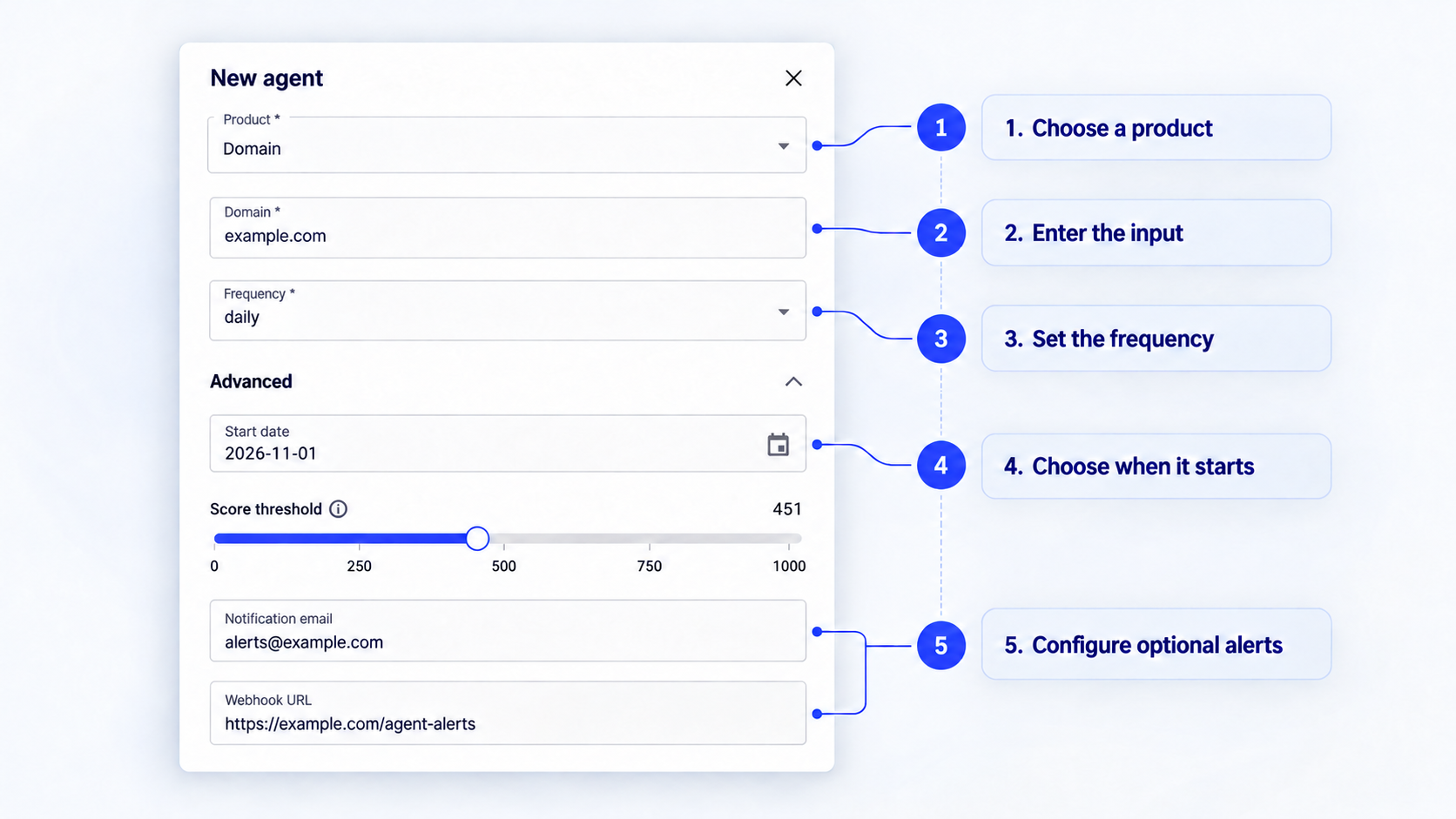
The example above creates a daily Domain Agent for example.com. It starts on November 1, 2026, and sends an email and webhook notification whenever the score falls below 451.
- Open Agents in the Trustfull dashboard.
- Select New agent.
- Select the product. Domain is currently the only available option.
- Enter the product input. For Domain, enter a domain without a protocol or path, such as
example.com. - Choose a frequency: daily, weekly, or monthly.
- Expand Advanced if you want to choose a start date or configure alerts.
- Select Create agent.
If you leave Start date empty, the Agent starts shortly after it is created. All Agent dates use UTC.
Only one Agent can be active for the same product, input, and App Key.
Configure alerts
Alerts are optional. Without an email address or webhook, the Agent continues to run but sends no notifications.
For products that return a score, Trustfull sends an alert when the score is lower than the configured Score threshold. The default threshold is 451.
Trustfull evaluates every Request independently. If several consecutive Requests return a score below the threshold, each one generates a new alert. An alert does not require the score to change from the previous Result.
For example:
| Result | Threshold | Outcome |
|---|---|---|
450 | 451 | Alert sent |
451 | 451 | No alert |
700 | 451 | No alert |
Configure either or both notification channels:
- Notification email sends an alert to the specified address.
- Webhook URL sends the complete result to a public HTTPS endpoint.
See Agent webhooks to configure an endpoint and verify signed requests.
Review Agent activity
The Agents table shows the product input, frequency, status, completed runs, last run, and next scheduled run.
Open an Agent or select View lookups from its action menu to review the Requests created by that Agent.
Because every run creates a separate Request, you can inspect each result independently and compare how the score changes over time.
Edit, stop, or restore an Agent
Open the action menu at the end of an Agent row:
- Edit changes the frequency, start date, score threshold, email, or webhook.
- Delete stops future runs and archives the Agent. Previous Requests remain available.
- Restore activates an archived Agent again and preserves its earlier history.
The product and input cannot be changed after creation. Create another Agent when you need to monitor a different input.
Trustfull may archive an Agent automatically when it cannot continue—for example, when its App Key is inactive or there are not enough credits. Resolve the reported issue before restoring it.
Limits
- Plan. Agents are part of the Enterprise plan.
- Products. Domain is currently the only product.
- Frequency. Daily, weekly, or monthly.
- Start date. Optional. When you set one, it must be at least five minutes in the future. Without it, the first run starts about one minute after creation.
- One active Agent per input. An App Key can have one active Agent for each product and input. Creating a second one returns
409. - Credits. Creating an Agent requires a balance of at least 200 credits on the App Key. When the credits run out, the Agent is archived with the reason
no_credits. - Webhook URL. It must use
httpsand pass the verification call described in Agent webhooks. - Number of Agents. There is no limit on the number of Agents per App Key.
FAQ
Is an Agent required to run a request?No. Use the API or Run Check for a one-off result. Create an Agent only when Trustfull should repeat the task automatically.
Does an Agent reuse the same Request?No. Every run creates a new Request and Result. The Agent is the saved configuration that connects them.
Do I have to configure alerts?No. The Agent continues to run on schedule when both notification fields are empty, but it does not send an alert.
What happens when I delete an Agent?The Agent is archived and no future runs are scheduled. Its previous Requests and Results remain available.
Further reading
- Agents API Reference — create, retrieve, update, archive, and restore Agents programmatically.
- Create an Agent recipe — follow a complete Python example for creating a scheduled Domain Agent.
- Agent webhooks — configure an endpoint and verify signed Agent alerts.
Updated about 8 hours ago