
Uploads
The Uploads page lets you analyse a large batch of customers in one go. Instead of calling the API once per customer, you upload a single CSV file and Trustfull runs the same enrichment on every row.
Uploads is one of the two ways to send Trustfull a file:
- Uploads — customers you want to analyse now. Use it to score a backlog, check a campaign, or try Trustfull on your own data.
- Training Sets — labelled results of lookups you already ran. Use it to measure how well the scores matched what really happened.
In short: use Uploads to get scores and enrich your data, use Training Sets to check how good past scores were.
What Your File Must Look Like
| Rule | Value |
|---|---|
| Format | CSV only |
| Encoding | UTF-8 |
| Maximum rows | 200,000 |
| Maximum file size | 4 MB |
| Separator | A comma (,) or a semicolon (;), the same one everywhere |
| Required columns | customer_id, and at least one signal column |
| Maximum value length | 200 characters (customer_id allows 256) |
Start from the template, then edit it
In the upload modal, click Download CSV template. The template holds every column Trustfull supports, filled with one example row:
customer_id,phone_number,email,ip,first_name,last_name,domain
your-customer-id,393481122333,[email protected],127.0.0.1,Mario,Rossi,example.com
Delete the columns you do not need, then replace the example row with your own data.
Edit the template before you upload itThe template includes the
domaincolumn alongside all the others. A domain file can only containcustomer_idanddomain, so if you upload the template unchanged it will be rejected. Delete thedomaincolumn, or delete all the other columns.
Columns
Every file needs two things.
The first is the customer_id column. The second is at least one signal column.
The customer_id is the name you give to the request. A signal is the data you want Trustfull to check. A phone number is a signal. An email address is a signal.
A row with a customer_id and no signal gives Trustfull nothing to check. Trustfull skips that row.
| Column | Required | What to put in it |
|---|---|---|
customer_id | Yes | Your own name for this request. Use a new one every time. Never use the same one twice. |
phone_number | No | International format, country code first, without + or leading zeros. |
email | No | The email address. |
ip | No | The IP address. |
first_name | No | The given name. Always pair it with last_name. |
last_name | No | The family name. Always pair it with first_name. |
domain | No | A website domain. See the rule below. |
model_id | No | The model that computes the score for that row. See Choosing the model. |
You must also include at least one signal column. Any other column name stops the upload.
model_idis not a signal
model_idtells Trustfull how to score a row, not what to analyse. A file withcustomer_idandmodel_idand nothing else holds no signal, and Trustfull rejects it. Always keep at least one signal column.
Choosing the model
By default, every row is scored with the model currently active for the product that runs. Add the optional model_id column to override that row by row, or leave it out and nothing changes.
| What you do | What Trustfull uses |
|---|---|
No model_id column in the file | The active model for that product |
model_id column present, cell filled in | The model you named |
model_id column present, cell empty | The active model for that product |
In an upload you can pass a model for Hub, Phone, Email, IP, Domain and Document rows.
Three rules to remember:
- The model must belong to the app key you selected in the upload modal.
- The model must be compatible with the row's product. The Models Library shows which products each model supports.
- One model per row. Different rows in the same file can use different models.
Where to find a model id
Open the Models Library in your dashboard. Each model has its own id, and that is the value to put in the column. Standard models can be used too, not just the ones you built yourself.
What Trustfull analyses
Trustfull works out which products to run from the columns you include:
| Columns you provide | Activated product |
|---|---|
phone_number | Phone |
email | |
ip | IP |
first_name and last_name together | Name |
| Two or more of the above | Hub: each product above returns its own score, plus a score for the whole identity |
domain | Domain Intelligence |
Three rules to remember:
- You cannot upload names on their own. If you include
first_nameandlast_name, add at least one other signal as well. - Keep domains in their own file. A file with a
domaincolumn can only containcustomer_id,domainand, if you want it,model_id. Any other column will be rejected. - Two or more signals become a Hub request. Trustfull returns a score for each product, and a Hub score for the whole identity.
Examples
Every file starts from the same template. What changes is which columns you keep.
Hub
Keep two or more signals and delete domain. Trustfull returns a score for each product it runs, plus a Hub score for the whole identity. Any combination works, as long as first_name and last_name travel together.
customer_id,phone_number,email,ip,first_name,last_name
cust-001,393481122333,[email protected],127.0.0.1,Mario,Rossi
cust-002,393482233444,[email protected],127.0.0.2,Anna,Bianchi
customer_id,phone_number,email
cust-001,393481122333,[email protected]
cust-002,393482233444,[email protected]customer_id,phone_number,first_name,last_name
cust-001,393481122333,Mario,Rossi
cust-002,393482233444,Anna,Bianchicustomer_id,email,ip
cust-001,[email protected],127.0.0.1
cust-002,[email protected],127.0.0.2Single product
Keep customer_id and one signal, then delete every other column. You get that product's score only, with no Hub score for the identity. Names cannot be used on their own, so there is no name-only file.
customer_id,phone_number
cust-001,393481122333
cust-002,393482233444
customer_id,email
cust-001,[email protected]
cust-002,[email protected]customer_id,ip
cust-001,127.0.0.1
cust-002,127.0.0.2Choosing a model
Add the model_id column to score rows with a model of your choice. Leave a cell empty to fall back to the active model for that row.
customer_id,email,model_id
cust-001,[email protected],your-model-id
cust-002,[email protected],your-model-id
customer_id,email,model_id
cust-001,[email protected],your-first-model-id
cust-002,[email protected],your-second-model-idcustomer_id,email,model_id
cust-001,[email protected],your-model-id
cust-002,[email protected],Domain
Keep customer_id and domain, then delete every other column. Domains cannot be combined with customer signals, so they always need a separate file.
customer_id,domain
cust-001,example.com
cust-002,another-example.com
Using semicolons
Any file above also works with semicolons, as long as every line uses the same separator.
customer_id;email
cust-001;[email protected]
cust-002;[email protected]
How to Upload a File
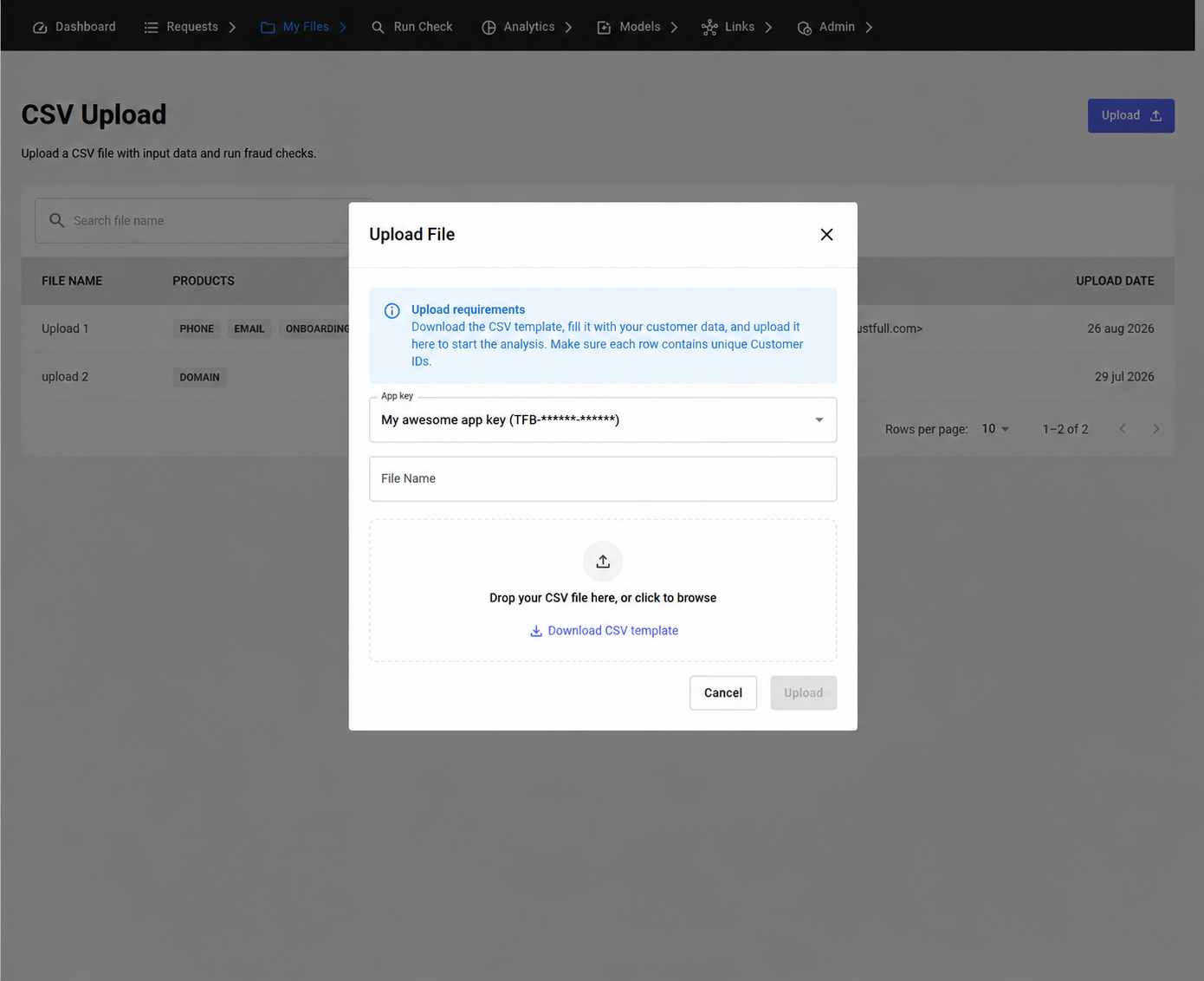
Uploading takes three steps: fill in the modal, wait for the check, then confirm.
1. Open the upload modal
Click Upload on the CSV Upload page. Select the App key the analysis runs against, give the file a name, then drop your CSV in the upload area.
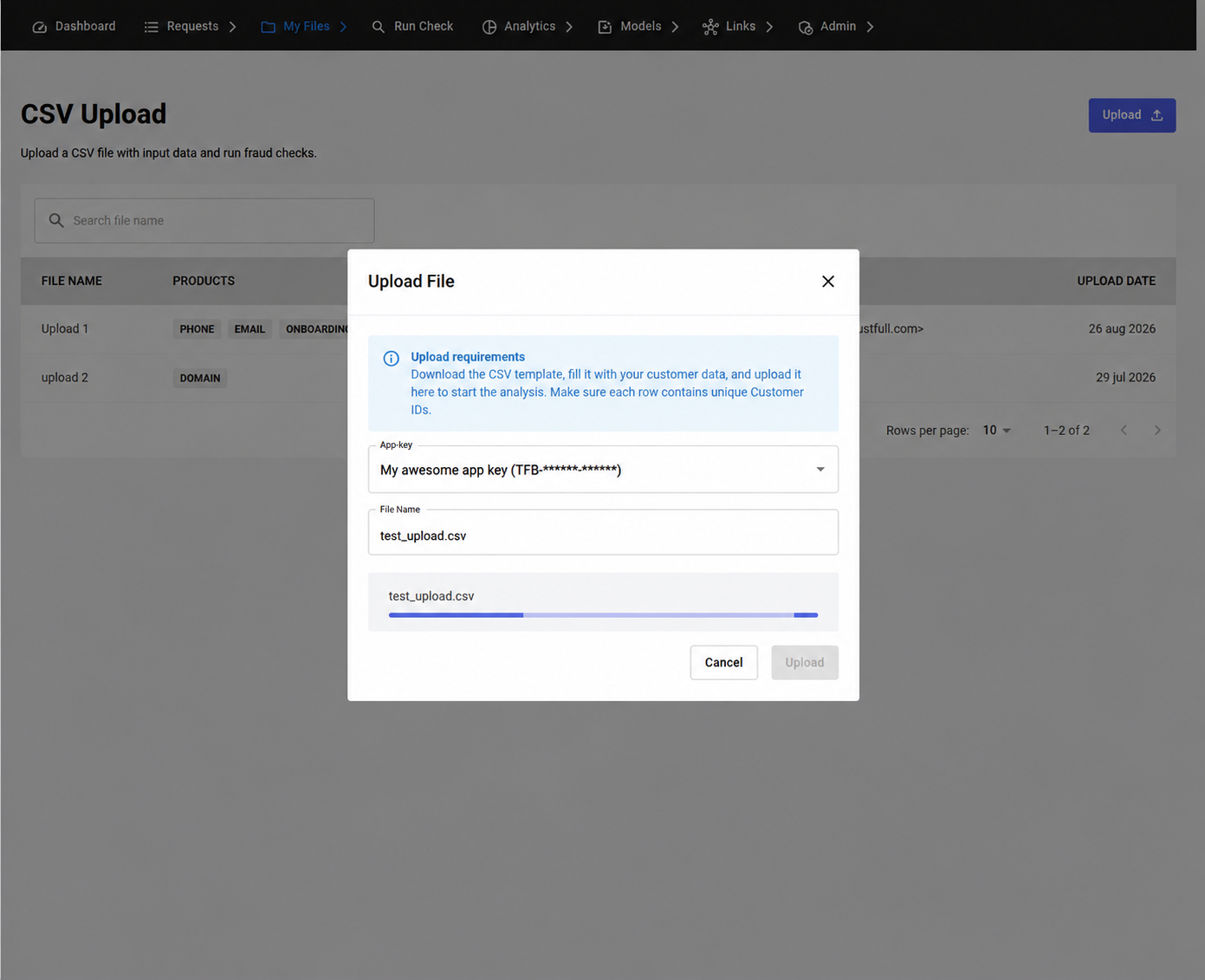
2. Wait for the check
Trustfull reads the whole file before it enriches anything, so you learn about problems before you spend credit. The upload waits in Validating while this runs.
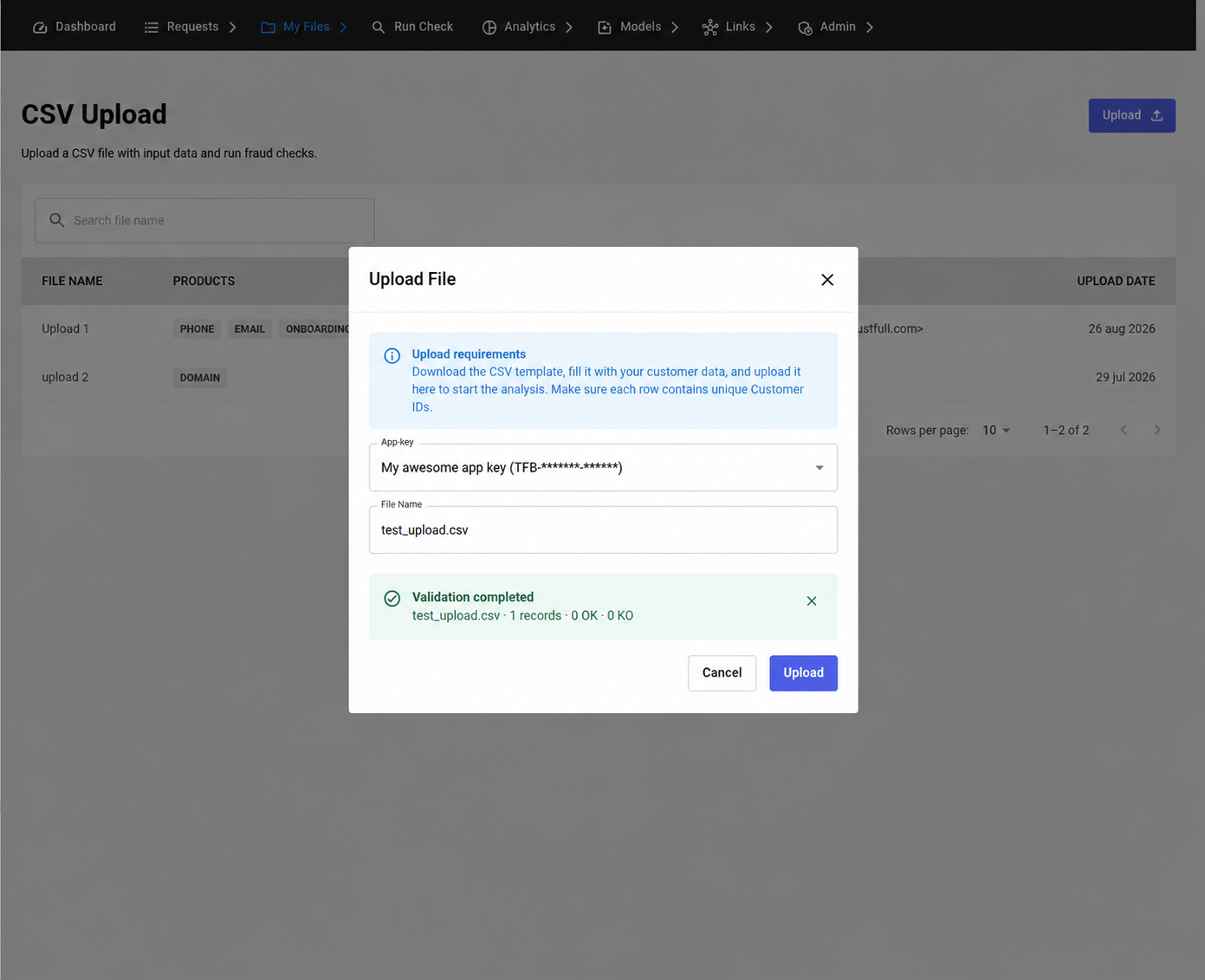
3. Start the import
When the file passes, a Validation completed banner shows the record count and the Upload button becomes active. Click it to start the run. Rows are enriched in the background, and the counters update as they complete.
What Trustfull Checks
The check runs before anything is enriched, so you do not start an upload with data that cannot be processed. A misspelled column, a broken phone number, or a customer_id used twice would otherwise cost you credit and give you nothing back for those rows. Trustfull finds these problems first, so you can fix the file and upload it again.
Trustfull reads every row, not a sample. The check happens in four passes.
The header
Trustfull confirms you used the same separator everywhere, that every column name is one it supports, and that customer_id is there. It also confirms a domain column is not sitting next to other signals, and that names are not the only signal in the file.
The columns
Trustfull looks down each column. If a column is named in the header but every row under it is empty, Trustfull tells you, so you can remove it.
Every row
Trustfull confirms customer_id is present, is not used twice, and is not longer than 256 characters. It checks that the row contains at least one signal. It then reads each phone number, email address, IP address and domain to check it is valid, and confirms no value is longer than 200 characters. It also looks at names, but a name problem never stops the row.
When a row names a model, Trustfull checks that the model exists for your app key and that it can score the product that row runs. A model that fails either check stops the whole upload, so you can fix the file before spending any credit.
Your balance
Before the run starts Trustfull works out what the file costs: the price of the products it detected, multiplied by the number of rows. If your balance does not cover it, the upload stops here.
The report groups problems by type and shows up to 100 examples, with a maximum of 5 per type. If there are more, the report says so.
Main Errors
A problem can stop the whole upload, skip a single row, or just be flagged as a warning.
Problems that stop the upload
Nothing is imported. Fix the file and upload it again.
| Error | What it means | What to do |
|---|---|---|
| Unrecognized column | A column name Trustfull does not support. | Rename or remove the column. The report lists the names you can use. |
| Domain mixed columns | A domain column sits next to other signal columns. | Move the domains into their own file. |
| Name claim alone | The file has names and nothing else. | Add a phone number, an email address or an IP address. |
| Malformed row | A row has more or fewer fields than the header. | Look for an extra separator or a value that needs quotes. |
| Empty column | A column is named in the header but every row under it is empty. | Remove the column. |
| Model not found | A model_id does not match any model of the app key you selected. | Check the id in the Models Library, and check you picked the right app key in the upload modal. |
| Model not compatible | A model_id names a model that cannot score the product that row runs. | Use a model built for that product, or remove the value to use the active model. |
| Insufficient credit | Your balance does not cover the file. | Top up, or split the file into smaller uploads. |
Problems that skip one row
The rest of the file is imported as normal. Only the row with the problem is left out.
| Error | What it means |
|---|---|
| Missing customer id | The row has no customer_id. |
| Duplicated customer id | The same customer_id is used on another row. |
| No claim | The row has a customer_id but no signal in it. |
| Invalid phone / Unparsable phone | The phone number cannot be read as a real number. |
| Invalid email | The email address is not valid. |
| Invalid IP | The IP address is not valid. |
| Invalid domain | The domain is not valid. |
| Value too long | A value is longer than 200 characters. |
| Missing first name / Missing last name | Only one half of the name is there. |
Warnings
The row is imported and analysed as normal. A warning tells you the data is poor quality, so the result for that row is less reliable.
| Warning | What it means |
|---|---|
| Name contains email | The name field holds an email address. |
| Name contains symbols | The name holds characters Trustfull does not expect in a name. |
| Name too short | The name is very short (minimum 2 letters). |
Upload Statuses
| Status | What it means |
|---|---|
| Validating | Trustfull is checking the file. |
| Validated | The file passed and is ready to start. |
| Pending | The run is queued. |
| Running | Rows are being enriched. |
| Completed | Every row is done. |
| Error | The run stopped. The report explains why. |
FAQ
Do I have to add themodel_idcolumn?No. It is optional. Leave it out and every row is scored with the model currently active for its product, exactly as before. Files you already use keep working with no change.
What happens if I leave amodel_idcell empty?That row is scored with the active model for its product. You can mix filled and empty cells in the same file.
Can I use a different model for each row?Yes. That is what the column is for. Each row is scored with the model named on it, as long as the model belongs to the app key you selected and can score that row's product.
Where do I find the id of a model?In the Models Library of your dashboard. Each model has its own id, and the Library also shows which products it supports. Standard models can be used as well, not only the ones you built.
Is the CSV template different now?No. The template is unchanged and does not include
model_id. Add the column yourself when you need it.
Can I upload an Excel file?No. The Uploads page accepts CSV only. Export your sheet to CSV first, and keep the encoding as UTF-8.
Can I upload the template without changing it?No. The template lists every column Trustfull supports, including
domain. A domain file can only containcustomer_idanddomain, so you need to delete either thedomaincolumn or all the other columns before you upload it.
Which separator should I use?A comma or a semicolon, whichever your tool produces. Trustfull reads the separator from the header row, so use the same one on every line. A file that mixes both is rejected.
Can I upload a file with only first name and last name?No.
Trustfull cannot run the name product on its own. A file with only
first_nameandlast_nameis rejected.Add at least one more signal. A phone number works. An email address works. An IP address works.
Can I put domain, email and phone in the same file?No. A file with a
domaincolumn can only containcustomer_idanddomain. Put the domains in one file and the other signals in another.
What happens if the same customer id appears twice?Trustfull skips the repeated row. The rest of the file runs as normal.
A
customer_idbelongs to one request only. This is why it must be different on every row.
Can I reuse a customer id from an earlier upload or API call?No.
A
customer_idbelongs to one request only. When you send it, that id is used. You cannot send it a second time. This is true for an upload, and it is true for an API call.Use a new
customer_idfor every row, and for every call.You may want to follow the same person across several requests. Keep that link in your own system. Send Trustfull a new
customer_ideach time.
Do I need to fill in every column?No, but you need at least one signal.
Include only the signals you have. Leave out the ones you do not have. Trustfull reads the columns in your file and runs the products that match them. Fewer columns means fewer products.
A file with only
customer_idholds no signal. Trustfull rejects that file.
How do I control which products run?Trustfull works them out from the columns you include. Add a column for each signal you want analysed, and leave out the ones you do not.
Can I stop an upload once I have confirmed it?No. Once you click Upload the file runs to the end, and there is no way to cancel it. Read the validation report carefully before you confirm, because that is your last chance to change the file.
What happens if I run out of credit halfway?That does not happen. Trustfull prices the whole file before the run starts and stops it if your balance does not cover it, so you never end up with a half-finished upload.
How large can my file be?A file can hold up to 200,000 rows and must be no larger than 4 MB. Most files reach the size limit before the row limit, so check both. Split larger sets into several uploads, or open a support ticket if you need to send more in one go.
Related
- Training Sets — the other upload type, for measuring model accuracy.
Updated 7 days ago