
June 2025 Update
over 1 year ago by Lorenzo Roveda
🔥June 2025 Update: We delivered more complete company profiles and safer end‑to‑end testing—enabled by the new Website Content Agent that auto‑extracts site metadata and Sandbox V2 at sandbox.trustfull.com for scenario‑based validation.
TRUSTFULL DOMAIN — Website Content Agent
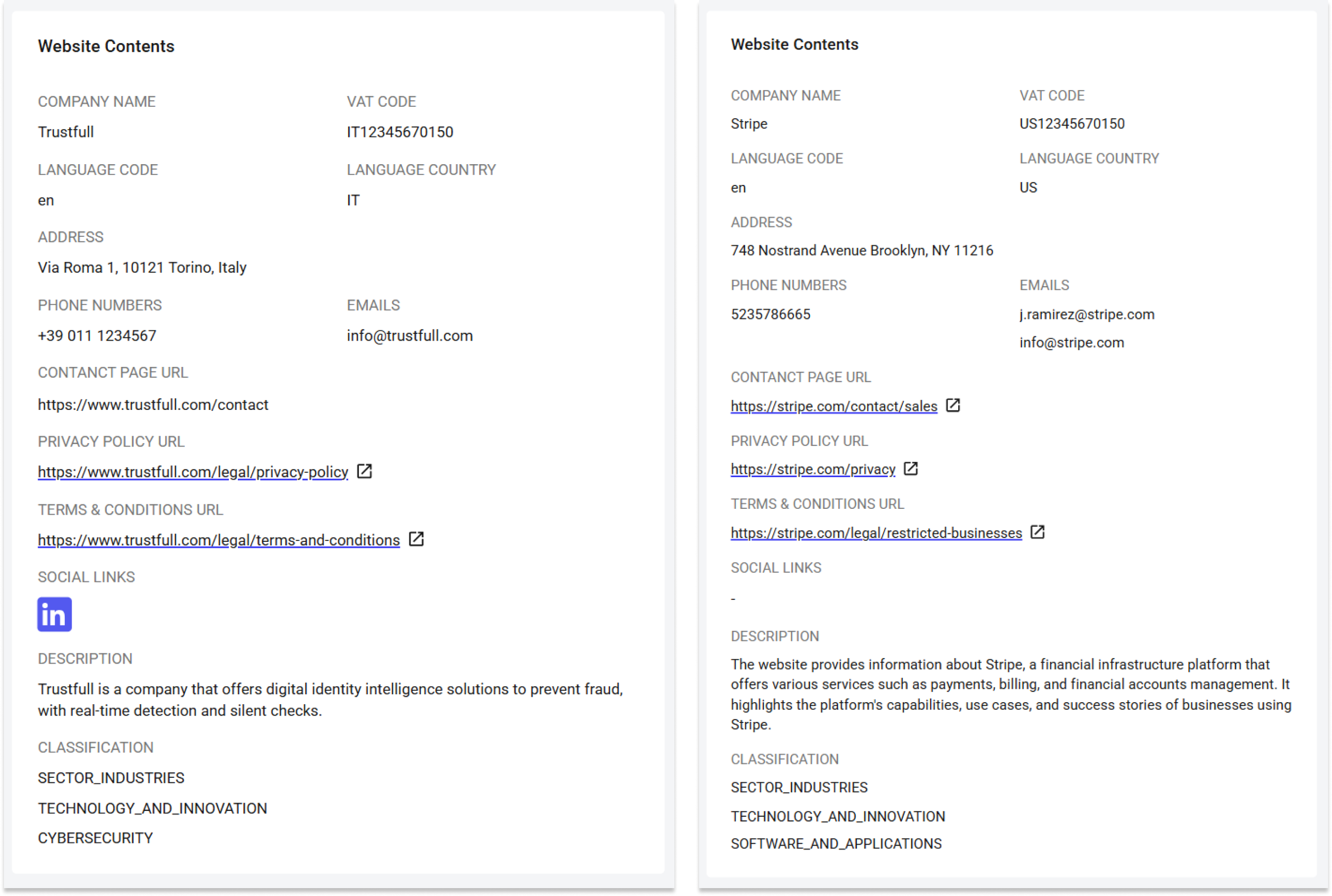
We launched a new AI agent inside Trustfull Domain: the Website Content Agent. This Agent can now parse raw websites to automatically extract company metadata including name, email, phone, VAT, social links, and more. This boosts Trustfull's Domain solution with complete and reliable company data.
🔍 Key Features
For the provided domain it returns:
- 🕵️♀️Identity and contact: Company + VAT, Contacts (emails, phones), Address
- 📑Legal and pages: Policies (privacy, terms), Contact page, Social links
- ✨Context and classification: Language (code, country), Description, Classification (tier1–tier3)
📊 Example Output
{
  "website_contents_emails": "[[email protected]](mailto:[email protected])",
  "website_contents_phone_numbers": "+39 011 1234567",
  "website_contents_address": "Via Roma 1, 10121 Torino, Italy",
  "website_contents_vat_code": "IT12345678901",
  "website_contents_company_name": "Example S.p.A.",
  "website_contents_language_code": "it",
  "website_contents_language_country": "IT",
  "website_contents_social_links": "{\"facebook\": \"https://www.facebook.com/example\"}",
  "website_contents_privacy_policy_url": "https://www.example.com/privacy-policy",
  "website_contents_terms_and_conditions_url": "https://www.example.com/terms-and-conditions",
  "website_contents_contacts_url": "https://www.example.com/contact",
  "website_contents_description": "This website provides and example of a website.",
  "website_contents_tier1": "TECHNOLOGY_AND_COMPUTING",
  "website_contents_tier2": "TECHNOLOGY_AND_COMPUTING",
  "website_contents_tier3": "TECHNOLOGY_AND_COMPUTING"
}website_contents_emails(string) — A string containing one or more email addresses extracted from the website contents.website_contents_phone_numbers(string) — A string containing one or more phone numbers extracted from the website contents.website_contents_address(string) — A string containing the physical address found on the website.website_contents_vat_code(string) — The VAT identification number found on the website.website_contents_company_name(string) — The company name found on the website.website_contents_language_code(string) — The ISO 639-1 language code of the website content.website_contents_language_country(string) — The ISO 3166-1 alpha-2 country code associated with the website language.website_contents_social_links(string) — A JSON representation of the list of social media profile URLs found on the website.website_contents_privacy_policy_url(string) — The URL pointing to the website's privacy policy page.website_contents_terms_and_conditions_url(string) — The URL pointing to the website's terms and conditions page.website_contents_contacts_url(string) — The URL pointing to the contact page of the website.website_contents_description(string) — A summary of website content.website_contents_tier1(string) — A tier 1 classification of the website scope.website_contents_tier2(string) — A tier 2 classification of the website scope.website_contents_tier3(string) — A tier 3 classification of the website scope.
SANDBOX V2— Safe end‑to‑end testing without touching production
Thanks to the new endpoint you can safely test your integration end‑to‑end with realistic responses by routing requests to the sandbox environment.
🔍 Key Steps
- Replace the endpoint with
sandbox.trustfull.com - Ensure you include an active API key.
- Send a formally correct request with the required payload.
- Use the
customer_idto simulate specific scenarios: high, good, moderate, bad, or poor.
📊 Example: Onboarding “good”
curl --request POST \
  --url https://sandbox.trustfull.com/1.0/hub \
  --header 'Accept: application/json' \
  --header 'Content-Type: application/json' \
  --header 'x-api-key: [your_app_key]' \
  --data '
{
  "customer_id": "good",
  "claims": [
    "phone",
    "email",
    "name",
    "score"
  ],
  "phone_number": "39349xxxxxxx",
  "email": "[t***@trustfull.com](mailto:t***@trustfull.com)",
  "first_name": "Tony",
  "last_name": "Stark"
}'
📚 Resources
- Support Center - Assistance and answers from the Trustfull support team.
- Trustfull Domain API Documentation - Information and guidelines on how to implement our Domain API.
- Trustfull Domain Guide - Guide on our Domain solution.
- API Sandbox Guide - Test products or Solutions.